
MareArts MSYS: the whole computer in one console, for you and your AI agent
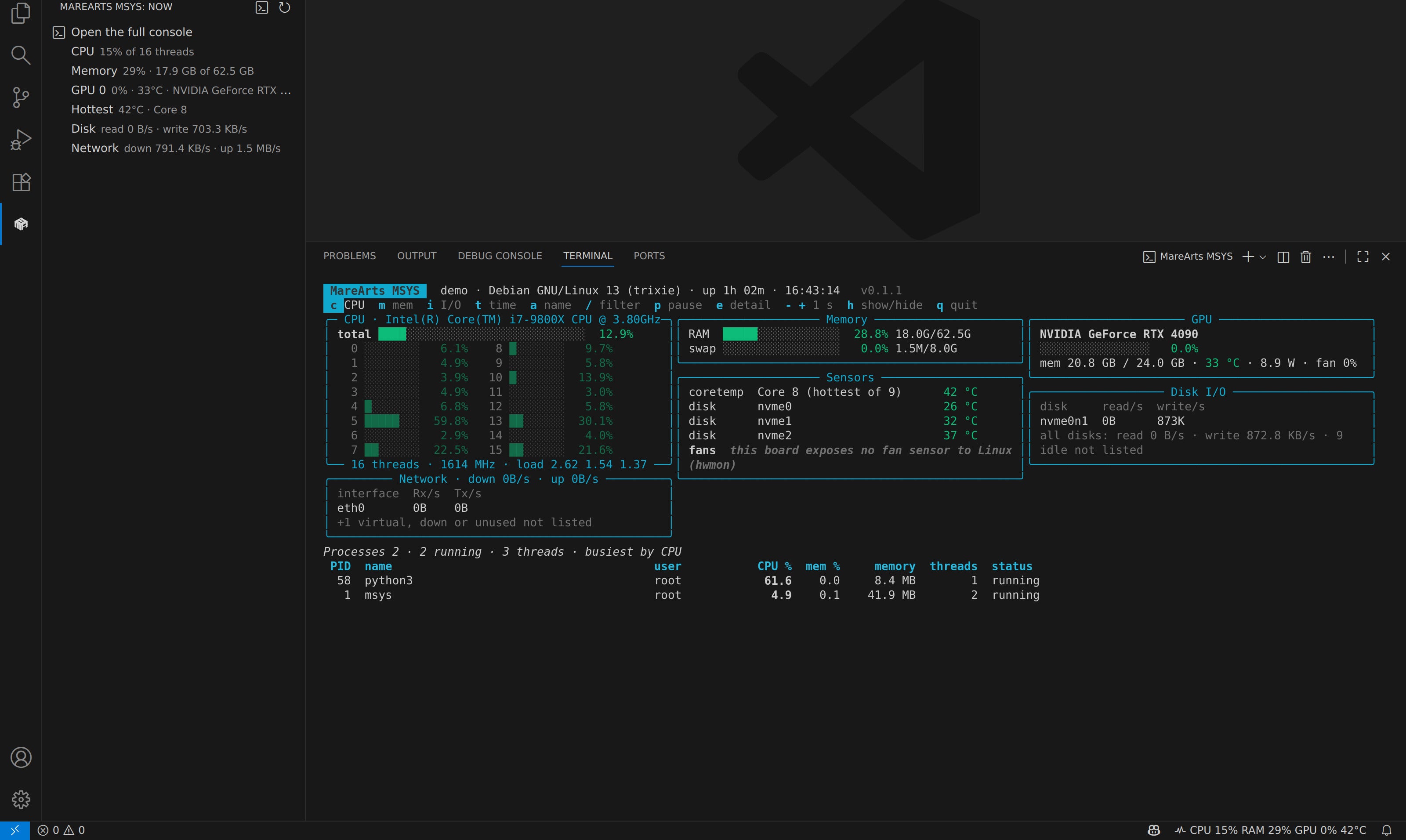
MareArts MSYS is a free system monitor that shows the whole computer in one console: CPU per core, memory, GPUs, temperatures, fans, disks, network, containers and the busiest processes. Your AI agent can read the same numbers through MSYS's own tools, so you can simply ask it what is slowing the machine down.
PyPI →VS Code Marketplace →Open VSX (Cursor) →
Start in one line
pip install marearts-msys
msys
Python 3.10 or newer on Windows (x64), Linux (x86_64, aarch64) and macOS (Apple Silicon and Intel). Press
h in the console for every key; q quits. msys --once prints one reading and
msys --json gives the same as JSON for your own scripts.
What you see
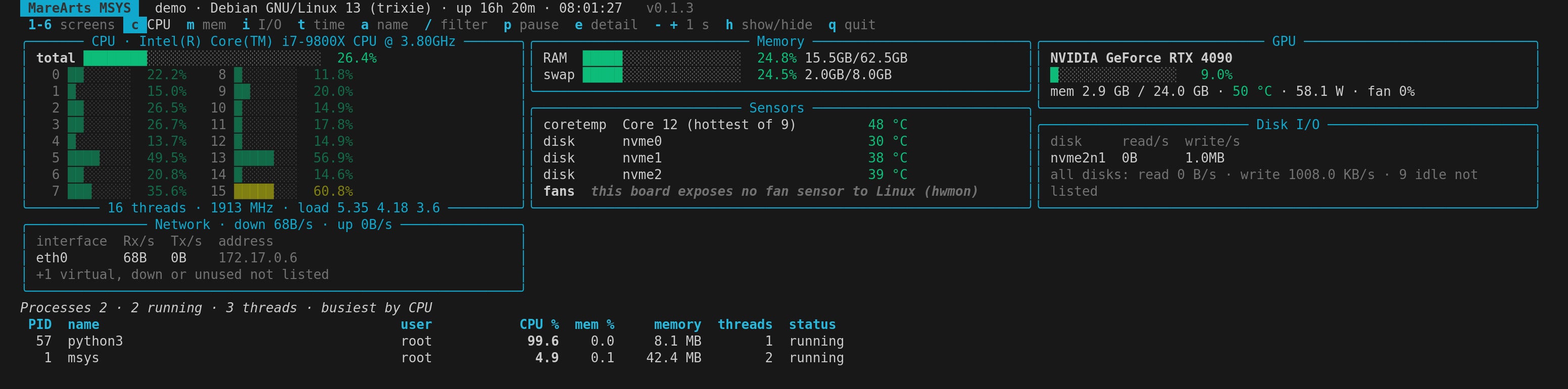
| CPU | Total and per core, user / system / iowait, load, context switches and interrupts per second |
| Memory | Used, cached, buffers, active, swap |
| GPUs | Use, memory, temperature, fan and power of each GPU |
| Sensors | CPU, board, disk and GPU temperatures, fan speeds, battery |
| Disks | File systems with free space, read and write speed of each disk |
| Network | Each interface, connections by state, listening ports, Wi-Fi signal |
| More | Docker containers, Linux software RAID, the busiest interrupts, alerts |
| Processes | The busiest ones, sorted by CPU, memory, disk I/O, CPU time or name, with a filter |
Each part turns on and off with one key (G GPUs, s sensors, n network …),
- and + read more or less often (0.5 to 60 seconds), and what you chose is kept for the
next start. When the terminal is short, the least needed parts step aside first so the process list still fits.
Dashboard screens 2–6
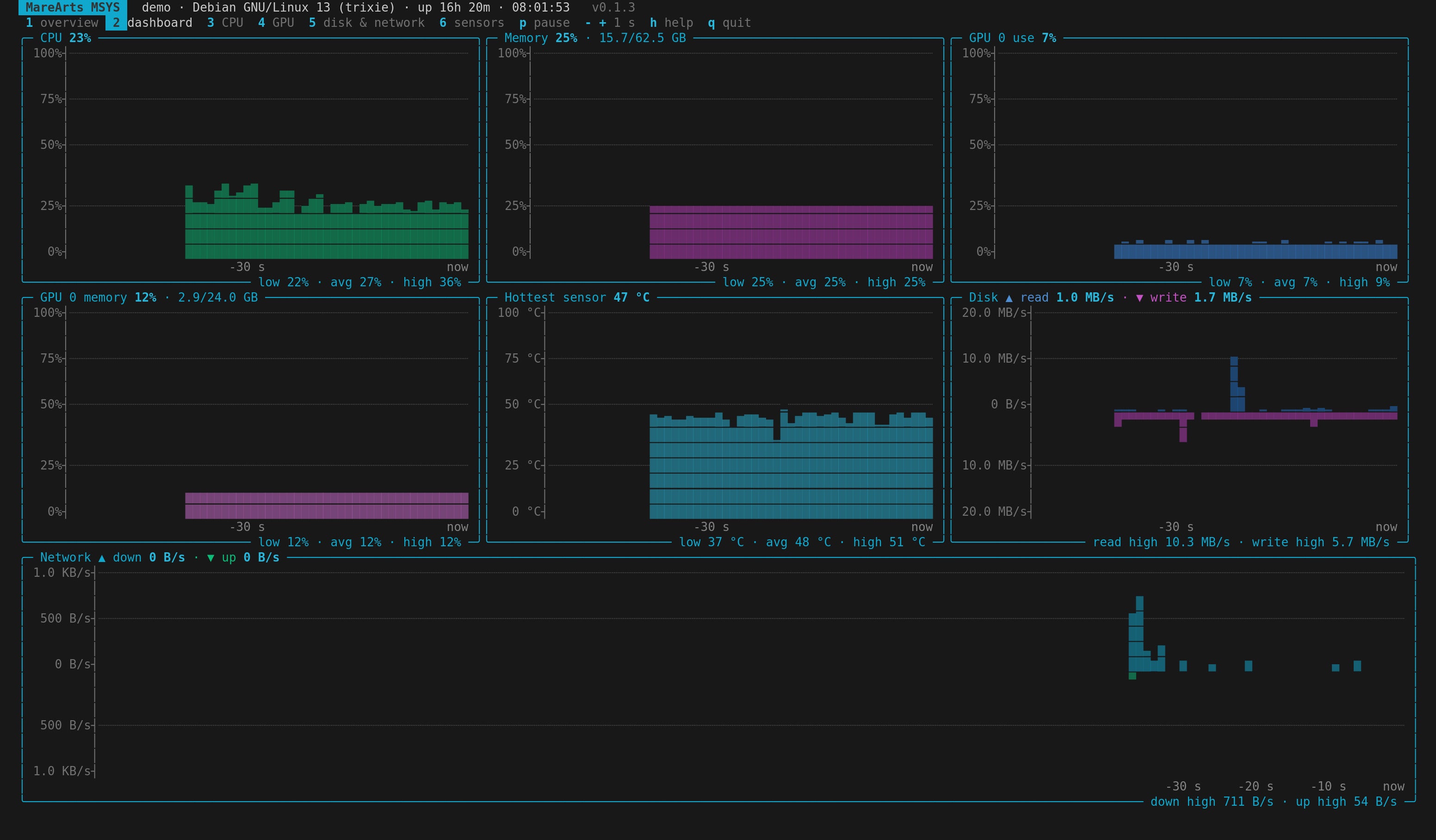
Press 2 to 6 for graphs over time without the process list: 2 the
dashboard, 3 CPU and every core, 4 GPUs, 5 disks and network, 6
sensors and fans; 1 goes back. Every graph says its values: a ruler on the left (0 to 100 %, or a round
speed such as 200 KB/s) and a time ruler below (−1 min … now). Disk read and write, or network down and
up, share one graph: one grows up, the other down. Readings at a warning level turn yellow, critical ones red. On a
small window a graph would be too thin to read, so each reading becomes one line instead: its value, a gauge, its
trend and its range, lined up like a table.
For your AI agent
msys --mcp starts an MCP server over standard input and output, for any AI app that speaks MCP.
The same tools work from the command line:
msys --tools          # list them
msys --tool summary   # CPU, memory, GPUs, heat
msys --tool top_processes by=memory limit=5
msys --tool watch samples=10 interval=2
An answer is plain JSON, for example (shortened):
{"cpu_percent": 7.7, "cores": 16,
 "memory_percent": 36.0,
 "gpus": [{"name": "NVIDIA GeForce RTX 4090",
           "utilization_percent": 0,
           "temperature_c": 24}],
 "hottest": {"label": "Package id 0",
             "current_c": 22.0},
 "alerts_active": 1}
Things you could ask:
- “What is using my GPU right now?”
- “Watch the CPU and temperatures for a minute while the build runs.”
- “Which disk is filling up, and which process writes the most?”
The tools only read the computer. The one thing an agent can change is what your live console shows (which parts, the sort, the interval), and a running console follows within one reading.
In VS Code and Cursor
The free MareArts MSYS - System Monitor extension puts CPU, memory, GPU and temperature in the status bar and in its own side bar (the MareArts MSYS icon in the activity bar), with Open the full console at the top. MSYS's tools are added to the editor's MCP servers by themselves for Copilot agent mode or Cursor's agent, and if the msys command is not installed yet, the side bar shows an Install button and picks MSYS up by itself when the install is done. On Remote SSH it runs on the server you are connected to, so you see the GPU box you are training on, not your laptop. Search MareArts MSYS in the Extensions view (VS Code 1.101 or newer, or Cursor).
Light and careful
- Reads only. It changes nothing on your computer; the one file it writes is its own console view.
- Never connects anywhere. No network calls, no data collected.
- Light. On a PC with 900 processes MSYS itself uses about 8 % of one core at a 1-second interval and 2 % at 5 seconds.
- Honest about sensors. Linux reads the kernel sensors and macOS reads CPU temperatures and fans without admin rights. Windows gives programs only GPU and disk temperatures, so where a number cannot be read, MSYS says so instead of guessing.
MareArts MSYS is part of MareArts AI Gadget, the desktop apps that you and your AI agent can both use.
MareArts MSYS 0.1.1 · free for personal and business use (licence in the package). Screenshots are real VS Code windows; the console runs on a clean demo machine. Visual Studio Code, GitHub Copilot, Cursor and NVIDIA are trademarks of their owners; MareArts is not affiliated with them. · Also on MareArts Open Lab.