docker MongoDB pull and run
#pull image
docker pull mongodb
#run container
docker run --name mongodb -d -p 27017:27017 mongo
ex) access in python
Thank you.
www.marearts.com
Retrive docker container IP address
replace 'container_name_or_id' -> 'you id or container name'
docker inspect -f '{{range .NetworkSettings.Networks}}{{.IPAddress}}{{end}}' container_name_or_id
Thank you.
mongodb python, Table recode export, loading, save csv, load csv
refer to below code:
.
.
Thank you.ππ»♂️
www.marearts.com
IP 2 Geometry information python
Here is official page:
https://pypi.org/project/ip2geotools/
https://github.com/tomas-net/ip2geotools
This is my try
..
..
The results :
165.132.116.105
Seodaemun-gu
Seoul
KR
37.5790747
126.9367861
Thank you. ππ»♂️
www.marearts.com
increase number in dynamodb field key value
Get Access permission
.
.
sample code
.
.
Thank you.
ππ»♂️
www.marearts.com
Rotation(orientation) correction when uploading photos from mobile (python, pillow)
Try to use ImageOps function.
Solution is simple refer to below code:
.
.
Thank you.
ππ»♂️
www.marearts.com
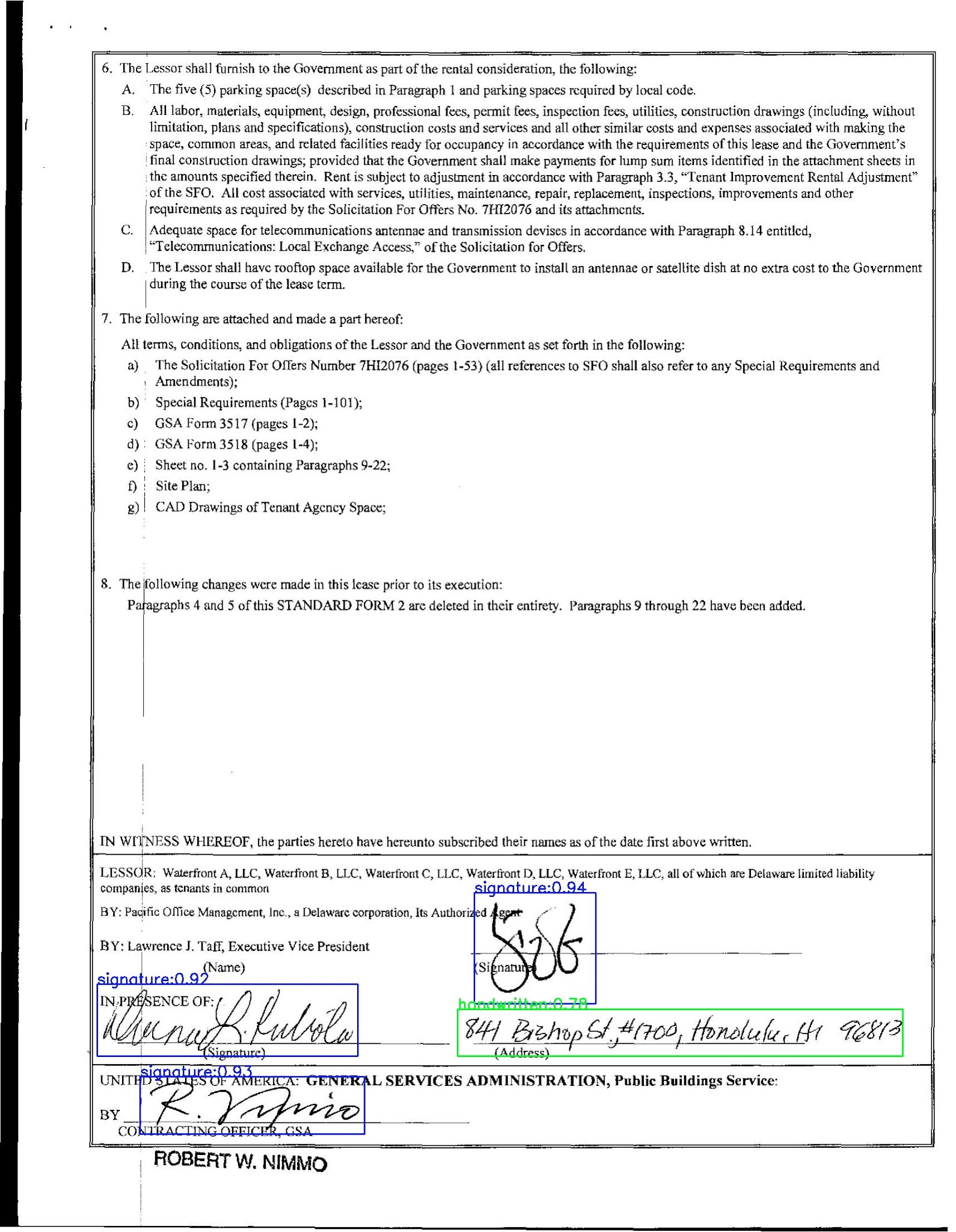
Signature & Handwritten Detection in scanned image
https://www.marearts.com/Signature-Handwritten-Detector-c81f875ddb66490a8db990b50ce6f665
Signature & Handwritten Detector on document image
Handwritten & Signature Detector on Document Image
* Live Demo
✍πΌ Signature & Handwritten Detector on Document
http://signhand.marearts.com/
* API explanation
https://www.marearts.com/Signature-Handwritten-Detector-c81f875ddb66490a8db990b50ce6f665
----------------------------------------
π· MareArts Free API List π·
MareArts π¬ Live
http://live.marearts.com
✍πΌ Signature & Handwritten Detector on Document
http://signhand.marearts.com/
π Auto Number Plate Recognition - Korean
http://redkongkr.marearts.com/
π¦ Car License Plate detector
http://lpdetector.marearts.com/
π³️π Representative Color Extractor
http://recolor.marearts.com/
π OCR Tess-v5
http://tessv5.marearts.com/
π Regular Expression Generator
http://regular.marearts.com/
π QRcode Generator
http://qr.marearts.com/
𦧠Barcode Generator
http://barcode.marearts.com/
π Elastic Image Generator
http://elastic.marearts.com/
π Mosaic Image Generator
http://mosaic.marearts.com/
⚽️ PDF to IMG convertor
http://pdf2img.marearts.com/
π PDF to TXT convertor
http://pdf2txt.marearts.com/
π PDF to HTML convertor
http://pdf2html.marearts.com/
⚾️ PDF to JSON convertor
http://pdf2json.marearts.com/
ππ»♂️ Thank you!
https://www.marearts.com
-----------------------------------
How to combine multiple criterions to a loss function? Multiple loss function for single model.
You can simply reference below code:
ex1)
b = nn.MSELoss()(output_x, x_labels) a = nn.CrossEntropyLoss()(output_y, y_labels) loss = a + b loss.backward()
ex2)
b = nn.MSELoss() a = nn.CrossEntropyLoss() loss_a = a(output_x, x_labels) loss_b = b(output_y, y_labels) loss = loss_a + loss_b loss.backward()
And there are many opinions in here:
https://discuss.pytorch.org/t/how-to-combine-multiple-criterions-to-a-loss-function/348/27
Thank you.
www.marearts.com
ππ»♂️
pdf2img, pdf to image, python library
way #1
--
--
way #2
--
--
Thank you.
www.marearts.com
ππ»♂️
python, simple mkdir and remove folder
Thank you.
www.marearts.com
ππ»♂️
print pdf from html, python code
Thank you.
www.marearts.com
python polygon list to rectangle
refer to below code:
--
--
Thank you.
www.marearts.com
compute_class_weight() takes 1 positional argument but 3 were given
put a explicit parameter name like:
Thank you.
www.marearts.com
.local/lib/python3.8/site-packages/kaggle/api/kaggle_api_extended.py", line 164, in authenticate raise IOError('Could not find {}. Make sure it\'s located in'
Thank you ππ»♂️
install awscli for linux (python)
Try to do these command
>pip install awscli --upgrade --user
>sudo apt install awscli
Thank you.
www.marearts.com
Get file list in s3 bucket folder (example python code)
refer to source code
..
..
Thank you
www.marearts.com
aws dynamodb scan all item using paginate
Refer to code, Thank you!
..
..
www.marearts.com
ππ»♂️
Docker container stop by image name
Stop docker container by image name:
imagename='mydockerimage'
docker stop $(docker ps | awk '{split($2,image,":"); print $1, image[1]}' | awk -v image=$imagename '$2 == image {print $1}')
Stop docker container by image name and tag:
imagename='mydockerimage:latest'
docker stop $(docker ps | awk -v image=$imagename '$2 == image {print $1}')
docker swarm simple command
*install virtualbox
-+-
-+-
* install docker-machine
...
...
*docker-machine
...
...
python save & load argparse
refer to code:
..
..
Thank you!
ππ»♂️
1D sequence (signal) data resampling (python)
import numpy as np
jupyter notebook to python py
run this command
>jupyter nbconvert your_notebook_name.ipynb --to python
thank you.
pytorch cuda definition
Their syntax varies slightly, but they are equivalent:
|
⠀ |
.to(name) |
.to(device) |
.cuda() |
|
CPU |
to('cpu') |
to(torch.device('cpu')) |
cpu() |
|
Current GPU |
to('cuda') |
to(torch.device('cuda')) |
cuda() |
|
Specific GPU |
to('cuda:1') |
to(torch.device('cuda:1')) |
cuda(device=1) |
Note: the current cuda device is 0 by default, but this can be set with torch.cuda.set_device().
write classification_report to txt file
Refer to code ^^
..
..
Thank you.
www.marearts.com
python pil change dpi without save file
look at the code! ^^
..
..
Thank you.
convert numpy.ndarray object to float
*Here is object dtype numpy.ndarray
> object <class 'numpy.ndarray'> [3 2 1 2 2]
python argparse simple example
It's useful to save hyper parameter for machine learning
import argparse
paser = argparse.ArgumentParser()
args = paser.parse_args("")
args.batch_size=10
args.epoch=10
Thank you.
vs code server failed to start
try to kill the server which you want access and try to access again
1 .ctrl-shift-p and choose:
2. Remote-SSH: kill VS Code Server on Host...
nginx.conf, set to accept last path and poxy it.
ex)
www.xxx.yy/aaa/ping
www.xxx.yy/bbb/ping
Those urls will go to /ping proxy.
AWS dynamoDB safe searching way, search item by scan and get it by paginator.
refer to follow code
--
--
Thank you.
www.marearts.com
AWS, find all file list in s3 bucket
Find all file list in s3 bucket
Thank you.
www.marearts.com
ERROR: Could not build wheels for tokenizers which use PEP 517 and cannot be installed directly
I met this error when I install simpletransformers or transformers.
I did many try but no luck.
But this was solution to me.
Install Rust before transformer installation.
so..
and install transformers
Thank you.
www.marearts.com
unable to prepare context: unable to evaluate symlinks in Dockerfile path: lstat /var/lib/snapd/void/Dockerfile: no such file or directory
if you install docker using snap, it can be happen.
so remove docker from snap installation
> sudo snap remove docker
And install docker again using apt
> sudo apt update> sudo apt upgrade
> sudo apt install docker.io
> sudo systemctl enable --now docker
labelme2yolo, yolo2labelme format converter
original page is here:
https://marearts.notion.site/Labelme2Yolo-Yolo2Labelme-3564dd886ac64b5499d6f2784a8a4be8
yolo2labelme main code
labelme2yolo main code
Thank you.
www.marearts.com
ππ»♂️
make python package zip for lambda layer using docker
Here is good reference for this subject:
https://aws.amazon.com/premiumsupport/knowledge-center/lambda-layer-simulated-docker/
https://dev.to/matthewvielkind/creating-python-aws-lambda-layers-with-docker-4376
If we use docker then it's very simple.
Let's go through step by step
1. make Main folder & python library folder
ex) In this tutorial, we suppose to need flask package
2. make requirements.txt and put packages to install by pip
So folder structure looks like this:
├── requirements.txt └── python/ └── lib/ ├── python3.6/ │ └── site-packages/ └── python3.8/ └── site-packages/
3. Run docker to install packages
note, change python version properly
4. compress package to zip
5. use zip file for your lambda
That's it all.
Thank you.
www.marearts.com
ππ»♂️