Showing posts with label Matlab. Show all posts

12/19/2016

Rotation Matrix Convert : Rotation(3x1) -> Matrix(3x3) -> Quntenion(4x1) -> Matrix(3x3) -> Rotation(3x1)

Rotation convert Test

Rotation(3x1) -> Matrix(3x3) -> Quntenion(4x1) -> Matrix(3x3) ->Rotation(3x1)

///
clc;
clear all;
%Rotation(3x1) -> Matrix(3x3) -> Quntenion(4x1) -> Matrix(3x3) ->
%Rotation(3x1)

% Rotation vector of x,y,z axis.
Rv = [13 20 50];

% 3x3 matrix of R vector (Results of the Rm1 and Rm2 is similar.)
Rm1 = rodrigues(Rv*pi/180)
Rm2 = mRotMat(Rv)

% Quntenion vector of R matrix
Rq1 = matrix2quaternion(Rm1)
Rq2 = matrix2quaternion(Rm2)

% R matrix of Q vector
Rm1_1 = quaternion2matrix(Rq1)
Rm2_2 = quaternion2matrix(Rq1)

% R vector of R matrix
Rv_1 = rodrigues(Rm1_1(1:3,1:3)) * 180/pi
Rv_2 = rodrigues(Rm2_2(1:3,1:3)) * 180/pi


///


Full source code is here
https://github.com/MareArts/Roation-Convert-Rotation-3x1---Matrix-3x3---Quntenion-4x1---Matrix-3x3---Rotation-3x1-

8/24/2016

slice 2d images to 3d volume plot in matlab

load mri
D = double(squeeze(D));

h = slice(D, [], [], 1:size(D,3));
set(h, 'EdgeColor','none', 'FaceColor','interp')
alpha(.1)


6/20/2016

Matlab vector index shuffle


V1 =[ 10 20 30 40 50 60 70];
V2 = V1( :, randperm( length(V1) ));

V2 =

     60    10    20    30    50    40    70

2/29/2016

SVD function built-in matlab convert to c++ code using matlab coder app.

I had a brief introduction about matlab coder in here.
http://study.marearts.com/2016/02/matlab-coder-simple-test-and-practical.html

Well, I have a interesting question.
It is also used to convert the MATLAB built-in functions to c ++ code?
example.. SVD function.

SVD(Singular Value Decomposition) is very useful function for solving linear algebra problem.
But it is difficult to find the source only pure c code, Often including a linear algebra as big library.

So, this article aims to convert SVD built in matlab function to c code and use the converted c code in Visual studio.

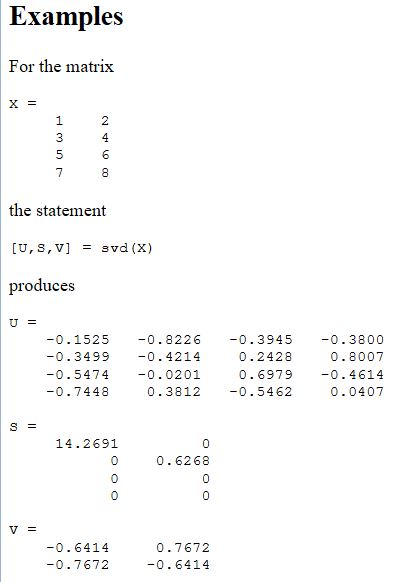
First, a start by calculating a fixed value of 4x2  matrix.


This is my example matrix and result.
This is an example in matlab help document.


First, let's look matlab code, it is very simple.
MySVD.m 
///
function [U, S, V] = MySVD(X)

[U, S, V]= svd(X);
///

testMySVD.m
///
X=[ 1 2
    3 4
    5 6
    7 8
    ];
    
[U, S, V] = MySVD(X);

U
S
V
U*S*V'
///

result


Now, let's convert MySVD.m to c code using matlab corder.

However, options for the input X is set to 4x2 double.


next,
An example using the code of MySVD c code in Visual Studio.
The result of visual studio is same with matlab.

MySVD C code is uploaded in github.


///
#include < iostream>
#include "MySVD.h"
using namespace std;


void main()
{
 double X[]={1, 3, 5, 7, 2, 4, 6, 8};
 double U[16]; //4x4
 double S[8]; //4x2
 double V[4]; //2x2

 //extern void MySVD(const real_T X[8], real_T U[16], real_T S[8], real_T V[4]);
 
 MySVD(X, U, S, V);

 cout << "U out" << endl;
 for(int i=0; i< 4; ++i) //row
 {
  for(int j=0; j< 4; ++j) //col
   cout << U[i+j*4] << " ";
  cout << endl;
 }
 cout << endl;

 cout << "S out" << endl;
 for(int i=0; i< 4; ++i) //row
 {
  for(int j=0; j< 2; ++j) //col
  {
   cout << S[i+j*4] << " ";
   
  }
  cout << endl;
 }
 cout << endl;


 cout << "V out" << endl;
 for(int i=0; i< 2; ++i) //row
 {
  for(int j=0; j< 2; ++j) //col
  {
   cout << V[i+j*2] << " ";
   
  }
  cout << endl;
 }
 cout << endl;

}
///

The sign is a little different
But value of U* S * V 'is as correct.
And sign is irrelevant since the opposite direction to the perpendicular direction.

Next let's study the use of nxm svd

First, let's create the code from matlab data type of NxN

:inf x :inf is nxn.
After code build, see the this c++ code

///
#include < iostream>
#include "MySVD.h"
#include "MySVD_emxAPI.h" //for emxArray_real_T
using namespace std;


void main()
{
double X[] = { 1, 3, 5, 7, 2, 4, 6, 8, 1, 2, 3, 4};
 double U[16]; //4x4
 double S[12]; //4x3
 double V[9]; //3x3


 emxArray_real_T *inputX, *outputV, *outputS, *outputU;
 inputX = emxCreateWrapper_real_T(&(X[0]), 4, 3);
 outputU = emxCreateWrapper_real_T(&(U[0]), 4, 4);
 outputS = emxCreateWrapper_real_T(&(S[0]), 4, 3);
 outputV = emxCreateWrapper_real_T(&(V[0]), 3, 3);

 //extern void MySVD(const emxArray_real_T *X, emxArray_real_T *U, emxArray_real_T *S, emxArray_real_T *V);
 MySVD(inputX, outputU, outputS, outputV);

 cout << "U out" << endl;
 for (int i = 0; i< 4; ++i) //row
 {
  for (int j = 0; j< 4; ++j) //col
   cout << U[i + j * 4] << " ";
  cout << endl;
 }
 cout << endl;

 cout << "S out" << endl;
 for (int i = 0; i< 4; ++i) //row
 {
  for (int j = 0; j< 3; ++j) //col
  {
   cout << S[i + j * 4] << " ";

  }
  cout << endl;
 }
 cout << endl;


 cout << "V out" << endl;
 for (int i = 0; i< 3; ++i) //row
 {
  for (int j = 0; j< 3; ++j) //col
  {
   cout << V[i + j * 3] << " ";

  }
  cout << endl;
 }
 cout << endl;

}
///


The input of dynamic size is set by "emxArray_real_T" type.
for example const emxArray_real_T *X

transfer double value to emxArray_real_T, we can use "emxCreateWrapper_real_T" function.
For this function, don't forget include "MySVD_emxAPI.h" or "xxxx_emxAPI.h".

You code like this.
inputX = emxCreateWrapper_real_T(&(X[0]), 4, 2);
or
outputU = emxCreateWrapper_real_T(&(U[0]), 4, 4);

double address is connected with emxArray_real_T.

Please check I have posted the source code in Github.

SVD 4x2 test
https://github.com/MareArts/Matlab-corder-test-SVD/tree/master/MySVD_test_4x2input
SVD 4xn test
https://github.com/MareArts/Matlab-corder-test-SVD/tree/master/MySVD_test_4xninput
SVD nx2 test
https://github.com/MareArts/Matlab-corder-test-SVD/tree/master/MySVD_test_nx2input
SVD 4x4 test
https://github.com/MareArts/Matlab-corder-test-SVD/tree/master/MySVD_test_NxN_input




Matlab coder simple test and practical use in Visual studio

Matlab coder is the tool that convert matlab code into C/C++.
If you very glad immediately to hear this, You will sympathize the needs with me.

This post is simple test that how to use matlab coder and how to utilize in the Visual studio.
see below video, then you will be able to very easily know.


1. make matlab function


2. execute matlab coder app in matlab app tab


 3. set file of project name.


4. set input parameter data type


 5. set static  c/c++ library and check code generate.

6. in more setting,
no check support non finite numbers in speed tab for non-necessary code no generation.
,no check make option, and check language c -> c++


7. build and view report.


8. Create empty project in VS, add generated c++ file to project
   function call and test.


See this video more detail.


note!, in the video, mex option selection is wrong action, static c/c++ library selection is right.


11/11/2015

Get Rotation and Translation from 2 groups of 3d points (calculate R, T between 2 points.)

I made this example source code referencing from this site.
http://nghiaho.com/?page_id=671


Key idea(main processing) is using SVD(singular Value Decomposition)

I  made first group consist of 3d points by random selection.


Second groups of 3d points is made by random rotation and translation.
Blue color is points of second group.


How to find R,T between 2 groups of 3d points ?
for detail, see below matlab source code.
After get R,T, second group can transform to original position.


matlab source code.

printf

%Get R,T from 2 groups of 3d points

%The first group is created by random selection
A3pt = rand(3, 10);
figure(10);
plot3(A3pt(1,:),A3pt(2,:),A3pt(3,:),'r.');%, axis equal

%The second group is made by random R,T from first group
v1=0.6*(2*rand-1); 
v2=0.6*(2*rand-1); 
v3=0.6*(2*rand-1);
R1=[1 0 0;0 cos(v1) -sin(v1);0 sin(v1) cos(v1)];
R2=[cos(v2) 0 sin(v2);0 1 0;-sin(v2) 0 cos(v2)];
R3=[cos(v3) -sin(v3) 0;sin(v3) cos(v3) 0;0 0 1];
R=R3*R2*R1;
T = rand(3,1);

B3pt = R*A3pt; %Rotation
for i=1:3 %dimension
        B3pt(i,:)=B3pt(i,:)+T(i);      % translation
end

%show 2 group
figure(1);
plot3(A3pt(1,:),A3pt(2,:),A3pt(3,:),'r.',B3pt(1,:),B3pt(2,:),B3pt(3,:),'bo');%, axis equal

%% get R,T
MeanA = mean(A3pt, 2);
MeanB = mean(B3pt, 2);

HH=zeros(3,3);
n = length(A3pt);
for i=1:n
    tA = A3pt(:,i) - MeanA;
    tB = B3pt(:,i) - MeanB;
    hh = tB * tA';
    HH = HH + hh;
end

[U,~,V]=svd(HH); 
Ri=V*U'; %get R
Ti=MeanA-Ri*MeanB; %Get T


%% confirm

B3pt_=Ri*B3pt;                       % Rotation 시키기 Apply transformation
for i=1:3 %dimension
    B3pt_(i,:)=B3pt_(i,:)+Ti(i);      % translation 시키기
end

%show 2 group
figure(2);
plot3(A3pt(1,:),A3pt(2,:),A3pt(3,:),'r.',B3pt_(1,:),B3pt_(2,:),B3pt_(3,:),'bo');%, axis equal


...

5/04/2015

Java.lang.NullPointerException error, matlab install on the MAC

I met the this error message, after installing matlab on MAC.


But don't worry about that, this youtube video will solve.
Watch this.


Thank you.

10/08/2013

OpenCV 2.46 Calibration example source code (using calibrateCamera function)

This is advanced from "http://feelmare.blogspot.kr/2011/08/camera-calibration-using-pattern-image.html"


When you run the calibration example source code, some information will ask you.
First question is to ask number of width corner points.
Second question is to ask number of height corner points.
Third question is to ask number of pattern boards.


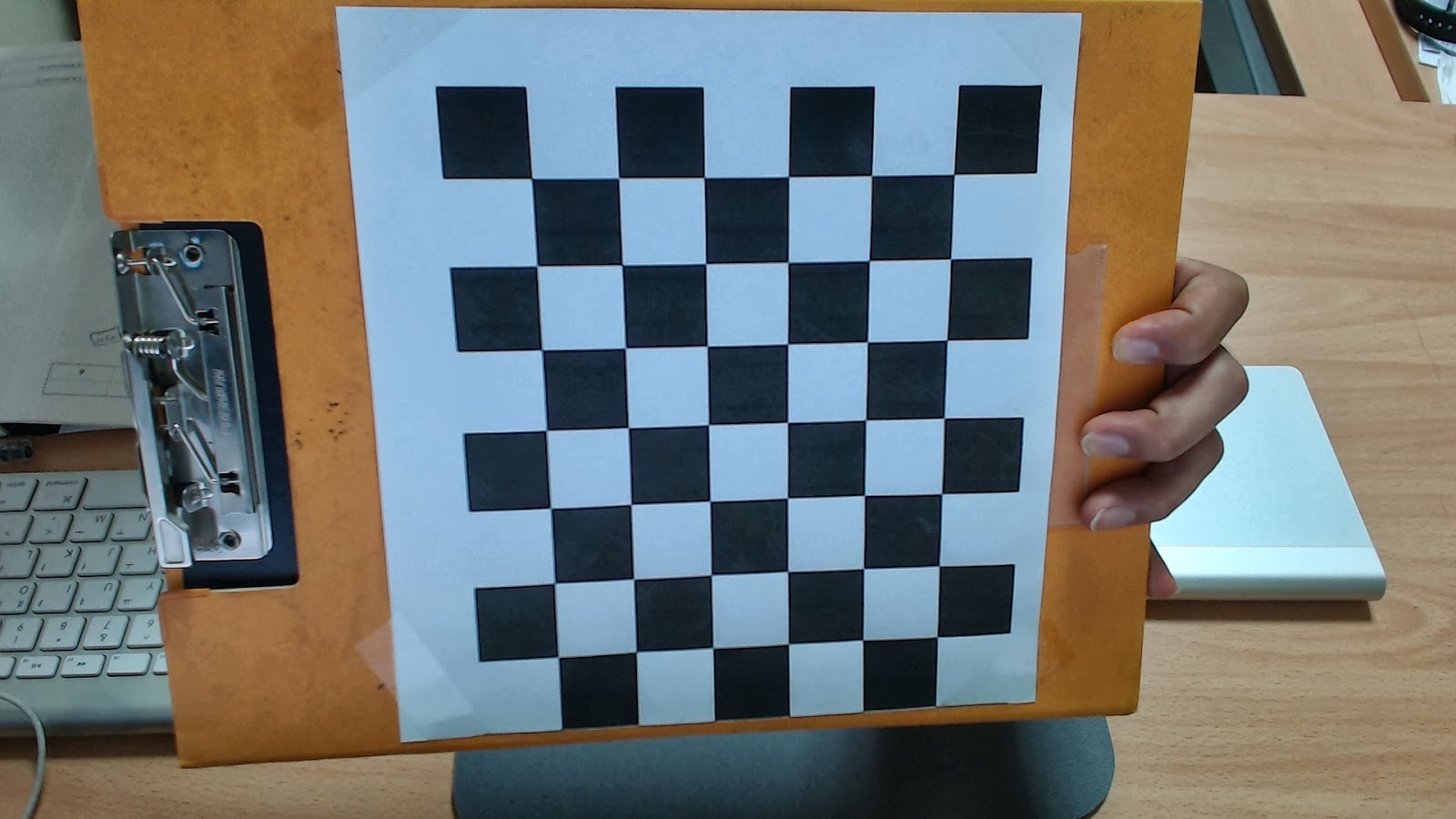
Because I use this chess board pattern, the answers is as follows


Of course, you have to prepare the captured images of chess pattern.

The source code detect corner points and calibration will be performed.
This function 'findChessboardCorners' is used to detection corners.
And 'calibrateCamera' function is used to get calibration parameters.

This is calibration example source code.


//code start

//code end


After calibration, the source code save ->
distortion_coeffs.txt
intrinsic.txt
rotation.txt
translatioin.txt
imagept.txt
objectpt.txt

and

The result images of corner detected.


This is matlab source code.
To confirm the result of calibration, I draw 2D image coordinate point to the 3D space.

m=[R|t]M or m=[R|-Rc]M
m is camera origin axis based coordinate.
M is world origin axis based coordinate.
In the -Rc, c is translate vector based on world origin axis.

pattern axis based
The equation is like this
R'(m-t)=M
In the equation, m is camera line coordinate for drawing.
M is camera coordinate based on pattern axis.


camera axis based, pattern position in 3D
The equation is like this
m=R*M+t or m=[R|t]M
In the equation, M is pattern coordinate for example -> [0 0 0; 10, 0 0; 0 10 0; 10 10 0] or 
R is rotation 3x3 matrix, t is 3x1 translation matrix.
After calibration, we can get each R,t of pattern boards.
m is pattern 3D coordinate based on camera origin axis. 


The main m file is Sapce2D3D.m in matlab files.

//matlab code start

//matlab code end
You can download calibration source code and matlab code in here.


1/25/2013

To save Txt file in the Matlab (dlmwrite function)

When you want to save vector values to Txt file, use dlmwrite function.
more detail information find in the matlab help file. (help dlmwrite)

-------------------------------------------------------
 simple example.
>>
>>dlmwrite('./saveV.txt', [1 2 3 4 5], 'delimiter', ' ');


 ->saveV.txt
1 2 3 4 5

--------------------------------------------------------

Thank you. ^^

1/02/2013

Matlab dimension change function -> reshape

Useful function ~ ^^

A = magic(3)

A =
     8     1     6
     3     5     7
     4     9     2

>> B = reshape(A, 1, 3*3)

B =
     8     3     4     1     5     9     6     7     2


11/29/2011

(TIP) Matlab Plot Option

colormap


Below code is example of matlab help document.
x = -pi:pi/10:pi;
y = tan(sin(x)) - sin(tan(x));
plot(x,y,'--rs','LineWidth',2,...
                'MarkerEdgeColor','k',...
                'MarkerFaceColor','g',...
                'MarkerSize',10)


You can describe axes on your image.
data2 = imread('map.tif');
figure(1);
iptsetpref('ImshowAxesVisible','on');
imshow(data2); %'colormap',bone(0)
set(gca, 'XTickLabel', {'a', 'b', 'c', 'd', 'e', 'f'} );
set(gca, 'YTickLabel', {100:100:700} );
xlabel('Longitude');ylabel('Latitude');


11/27/2011

(TIP) Making a file name appending number in Matlab

It is simple and easy but I can not remember the code well when I need this code.
So I leave this code in my blog.
And I hope the code is also useful to all visitor.
Thank you.

endIndex = 10;
for j=1:endIndex
     Index = num2str(j);
     dataD = strcat(Index,'saveFile.txt')
     data = load(dataD);
end

->
This source code can load below file names sequentially.
1saveFile.txt
2saveFile.txt
3saveFile.txt
4saveFile.txt
5saveFile.txt
6saveFile.txt
7saveFile.txt
...

11/07/2011

Rotation Matrix Converting Matlab Source (Euler Angle, Rotation Matrix, Quanternion)

There are many expression to show the rotation value.
(Ex. : Euler, Matrix, Quaternion.. )

This code is the test source to convert each other.
Euler -> Matrix -> Quanternion -> Matrix -> Euler
We can show the first Euler value is same with the last Euler value.

The source code is like below:
--------------------------------------------------------------

% Rotation vector of x,y,z axis.
Rv = [13 20 50];

% 3x3 matrix of R vector (Results of the Rm1 and Rm2 is similar.)
Rm1 = rodrigues(Rv*pi/180)
Rm2 = mRotMat(Rv)

% Quntenion vector of R matrix
Rq1 = matrix2quaternion(Rm1)
Rq2 = matrix2quaternion(Rm2)

% R matrix of Q vector
Rm1_1 = quaternion2matrix(Rq1)
Rm2_2 = quaternion2matrix(Rq1)

% R vector of R matrix
Rv_1 = rodrigues(Rm1_1(1:3,1:3)) * 180/pi
Rv_2 = rodrigues(Rm2_2(1:3,1:3)) * 180/pi

-----------------------------------------------------------------------
<Source Code>

The copyright of "rodrigues' and 'quaternion' functions is reserved by Peter Kovesi.

I wish this source code is useful to you.
Thank you.